
A syllable splitter extension that marks the breaks on any web page
Long words are where reading stalls. Emboldened’s syllable dots show where each word breaks, in·for·ma·tion, on any web page, drawn over the text rather than inserted into it, so copying and pasting still gives you the original words. It’s a Pro feature, with a 14-day free trial when you install.
Why syllables help
A fluent reader doesn’t sound words out; they recognise them whole, or in large chunks. For a reader with dyslexia, that chunking is the hard part. A word like unfortunately arrives as thirteen letters with no obvious handholds, and the eye either stalls at the start or skips to the end and guesses. Breaking the word into its syllables, un·for·tu·nate·ly, turns one hard problem into five easy ones, each of which is a shape the reader already knows.
This is why syllable division is a standard part of structured literacy teaching for dyslexia: learners are taught to find the vowels, split the word, and read the pieces. A syllable splitter on screen does the splitting for you so that the reading can happen. It’s an accommodation rather than a lesson, in the same way that a reading ruler is, and like a ruler it’s most useful on the days when the words are long and the reader is tired.
How Emboldened’s syllable dots work
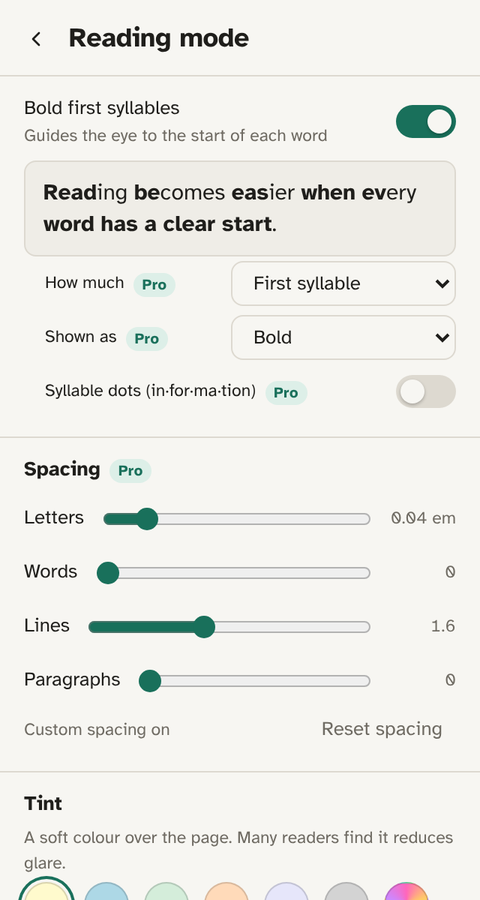
Switch on Syllable dots and a small, faint dot appears between the syllables of every word on the page. The dots are drawn by the extension’s styling, not typed into the text: the page’s words are unchanged underneath, which means search on the page still works, screen readers read the words normally, and when you select and copy a sentence you get information, not in·for·ma·tion.
The breaks come from a 139,000-word syllable dictionary bundled with the extension, the same one it uses to bold the first syllable of each word. Because it’s a dictionary rather than a rule, the splits are the ones a dictionary would give you: peo·ple, dif·fer·ent·ly, af·fects. Words the dictionary doesn’t know are left whole rather than guessed.
Syllable dots combine naturally with bold first syllables, which is free: the first syllable is bold and the rest are separated by dots, so the eye lands on the start of the word and then steps through it. On a page with letter spacing added as well, long words become genuinely easy to walk through.
Who it’s for
Syllable dots suit readers who decode word by word rather than at a glance: children and adults with dyslexia, people reading in English as a second language, and anyone working through technical or academic text full of long Latinate words. They’re less useful for fast readers who already chunk words whole, and they can feel busy on a page of short words, which is why the setting is a switch you’ll turn on for the heavy pages and off for the light ones rather than something to leave on permanently.
How to turn it on
- Install Emboldened from the Chrome Web Store.
- Click the Emboldened icon, then Reading mode.
- Switch on Bold first syllables if it isn’t already, then Syllable dots. The dots appear on the page straight away.
- If the dots are too faint or too strong for a particular site, add a little letter spacing (also on this screen) so the dots have room.
Syllable dots are part of Emboldened Pro. Every Pro feature is switched on for 14 days when you install, with no card and no sign-up, so you can see whether they help before deciding.
Limits worth knowing
English syllabification is not perfectly regular, and no dictionary agrees with every other dictionary on every word. Emboldened’s splits are good for the overwhelming majority of common words, and it deliberately leaves unknown words alone rather than splitting them wrongly. Text in editors and text boxes is never marked, so the dots don’t appear while you’re typing. Syllable dots are for English; other languages pass through unchanged.
Like all extensions, it can’t run on Chrome’s own settings pages or in the Chrome Web Store.
Other ways to split syllables on screen
Microsoft Edge’s built-in Immersive Reader has a syllables option under its grammar tools, along with line focus and text spacing. It’s well made and free, but it only works on pages Edge recognises as articles, and it shows the page in its own reader layout rather than on the site itself. We cover the trade-off in Emboldened vs Immersive Reader. On a Mac, there’s no built-in equivalent for the web.
Emboldened’s dots work on the page you’re already reading, in the layout the site gave it, and alongside the other settings on the same screen: bolding, spacing, fonts and tint. If you’re putting together a set of adjustments for dyslexia rather than one tool, how to make websites easier to read with dyslexia walks through what to combine.
Questions
Does it change the text on the page?
No. The dots are drawn over the words by the extension’s styling. Copying, searching and screen readers all see the original text.
Is it free?
Syllable dots are a Pro feature. Bolding the first syllable of each word, which uses the same dictionary, is free. Every Pro feature is on for 14 days when you install.
Where do the syllable breaks come from?
A 139,000-word syllable dictionary bundled with the extension. It works offline, and words it doesn’t know are left whole rather than guessed.
Does it work in other languages?
The dictionary is English. Text in other languages is left unmarked.
Will the dots show while I’m typing?
No. Text boxes, editors and forms are always left alone.
Free to install. Every Pro feature is on for 14 days, no card. Nothing you read leaves your computer.