
Emboldened vs BeeLine Reader
BeeLine Reader and Emboldened attack different problems. BeeLine colours each line in a gradient so your eye follows it round to the start of the next line; Emboldened bolds the start of each word so your eye moves along a line in steps, and adds a ruler, spacing, tint, dark mode and read-aloud around that. Many people find one works for them and the other doesn’t, so it’s worth understanding which problem you actually have.
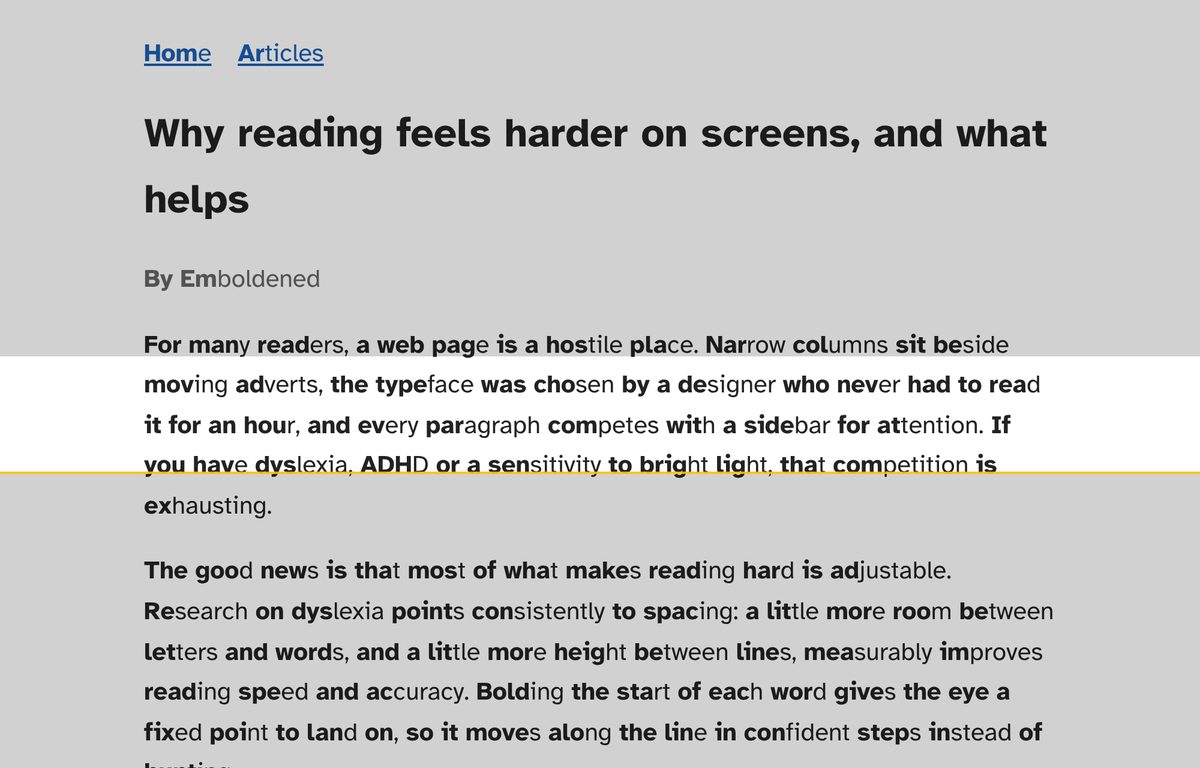
Two problems, two fixes
Losing your place at the end of a line, jumping to the wrong line, re-reading the one you’ve just read: that’s a line-tracking problem, and it’s what BeeLine Reader was invented for. It paints a colour gradient across the text (red into blue into black, say) so the end of one line and the start of the next share a colour, and your eye uses the colour to make the return sweep. The company reports faster reading and more time spent reading in its own trials with partners such as Perlego and CNET; those are its figures, not independent ones, but the effect for people who struggle with the return sweep is real enough that it has lasted.
Losing your place within a line, words swimming, the sense that you’re hunting for the next word rather than reading it: that’s a different problem, and it’s what bolded word starts address. Emboldened bolds the first syllable of every word (looked up in a 139,000-word dictionary) so each word has an obvious landing point. For the return-sweep problem it uses a different tool: a reading ruler, a clear band that follows your mouse while everything above and below is shaded.
Side by side
| BeeLine Reader | Emboldened | |
|---|---|---|
| Core technique | Colour gradient across each line | Bold the first syllable of each word, plus a ruler that follows the mouse |
| Helps with | Line tracking, the sweep back to the next line | Word-level fixation, keeping the current line in view, glare, fatigue |
| Browsers | Chrome (also Edge and Brave), Firefox, Safari on iOS | Chrome, Edge, Brave and other Chromium browsers; desktop only |
| PDFs | Text-based PDFs via its PDF extension | No |
| Ebooks | Via Perlego and partner sites | No |
| Fonts | Not its focus | Atkinson Hyperlegible, Lexend, OpenDyslexic bundled, free |
| Spacing | No | Pro: letter, word, line, paragraph |
| Tint, dim, dark mode | Colour schemes for the gradient, including a dark one | Free: six tints, dim slider, dark mode that leaves images untouched. Pro: soft white |
| Read aloud | No | Free for selected text, with word highlighting; Pro reads from any paragraph with an on-page player |
| Dictionary | No | Pro, double-click, works offline |
| Free tier | Free mode “lasts forever” on a list of favourite sites you choose | All free features on every site, no limits |
| Price | BeeLine Pro $1.99 a month (annual discounts); Family Pack $8 a year per browser; site licences for universities | Pro £85 a year, 14-day trial, up to 5 devices |
BeeLine’s details are from its website and Chrome Web Store listing at the time of writing (about 30,000 users, rated 2.8 out of 5 from roughly 200 reviews, updated September 2026). Check them before you decide.
What BeeLine Reader does better
- The return sweep. If your specific difficulty is finding the next line, a colour gradient is a more direct fix than a ruler, because it works without you moving the mouse and it works on every line at once.
- Firefox and iOS Safari. BeeLine runs where Emboldened doesn’t, and its iOS Safari extension is free with unlimited use.
- PDFs and ebooks. Its PDF extension and its integration with Perlego and partner platforms bring the gradient to reading Emboldened can’t reach.
- Price. BeeLine Pro is cheaper than Emboldened Pro; its Family Pack is cheaper still.
- Institutions already using it. It has been embedded in Blackboard and other platforms, so a university may already provide it.
What Emboldened does better
- Word-level help. BeeLine doesn’t change the words; Emboldened gives each one a bold start, and in Pro can bold more of each word, add syllable dots to break long words up, or use colour rather than weight.
- Everything else that helps. Spacing (the best-evidenced single adjustment for dyslexia), three readable fonts, tint, dim, soft white and a dark mode that doesn’t invert your photos. A gradient on a glaring white page is still a glaring white page.
- A ruler you can tune. Height and shade are adjustable, and Pro adds a vertical column ruler for tables and code.
- Read-aloud with highlighting. For many people with dyslexia or ADHD, hearing the text with each word highlighted beats any visual trick. Emboldened does this with the voices already on your computer; Pro adds “read from here” and a small player with speed from 0.5× to 3×.
- Nothing to sign up for, nothing collected. No account, no analytics; nothing you read leaves your computer; every free feature works offline.
- Unlimited free tier. BeeLine’s free mode is limited to a list of favourite sites; Emboldened’s free features work on every site.
Colour sensitivity: a caution
Some readers with visual stress find a multi-coloured gradient makes text harder, not easier: the colour itself becomes the thing the eye attends to. If that’s you, BeeLine’s quieter colour schemes may still work, but you may find a single soft tint and a ruler calmer. Emboldened’s Light-sensitive preset sets a tint, dim and soft white together, and the ruler is one plain band. The only way to know is to try both on your own reading for a few days.
Using them together
They don’t conflict in principle: one changes colour across lines, the other changes weight within words. In practice two extensions restyling the same text can look busy, and some readers find the combination is more cue than they want. Try each alone first. Emboldened has a per-site switch, so you can leave BeeLine in charge of long-form sites and Emboldened on everything else, or the reverse.
Trying them
BeeLine’s free mode and Emboldened’s free tier both let you test on your own reading. Emboldened is on the Chrome Web Store; every Pro feature is on for 14 days after install with no card and no sign-up.
Questions
I jump lines when I read. Which one?
Try BeeLine first for the gradient, and Emboldened’s ruler as the alternative; some people prefer a single clear band to a colour cue. Emboldened’s ruler is free.
I lose words in the middle of a line. Which one?
That’s the word-fixation problem bolded word starts address. Try Emboldened’s bolding, and add letter spacing (Pro) if words still crowd.
Does Emboldened colour lines like BeeLine?
No. Its tools are bolding, a ruler, tint, spacing, fonts and read-aloud. BeeLine’s gradient is its own technique.
Does either change the page’s text?
No. Both restyle text without altering it. In Emboldened, copying from a bolded page gives you the original words.
Free to install. Every Pro feature is on for 14 days, no card. Nothing you read leaves your computer.