
Emboldened vs Bionic Reading
Both bold the start of words so your eyes have somewhere to land. Bionic Reading is a suite of apps, fonts and converters for reading documents and ebooks across devices; Emboldened is a browser extension that changes the web page you’re on and adds spacing, a ruler, tint, dark mode and read-aloud. Here’s the difference, plainly.
The one-paragraph version
Choose Bionic Reading if you read in files and ebooks, want the effect on your phone, or want its typeface inside other software. Choose Emboldened if your reading happens in a browser and you want the bolding plus the other adjustments that help with dyslexia, ADHD or light sensitivity, without an account and without converting anything. Emboldened’s bolding is free; its deeper tools are £85 a year with a 14-day trial.
What each one is
Bionic Reading
Bionic Reading GmbH, based in Switzerland, sells the method as a product family: reader apps for web, iOS, Android, macOS and Windows; a Chrome extension; a Word add-in; a keyboard for iOS and Android; and one-off font purchases ($79 for the standard or serif font, $139 for the bundle). The reader apps have a free “Discover” tier (text conversion up to 2,000 characters, unlimited website conversion) and two paid tiers, Premium ($1.95 a month billed annually) and Premium Plus ($8.25 a month billed annually), which raise the limits and add file conversion, downloads as EPUB, PDF or Word, and Send to Kindle. The Chrome extension’s Web Store listing shows about 100,000 users with a 2.4-out-of-5 rating from roughly 300 reviews, and a last update in mid-2024. Its settings let you adjust fixation (how much of each word is bolded), saccade (how many words are bolded), opacity and colour.
Emboldened
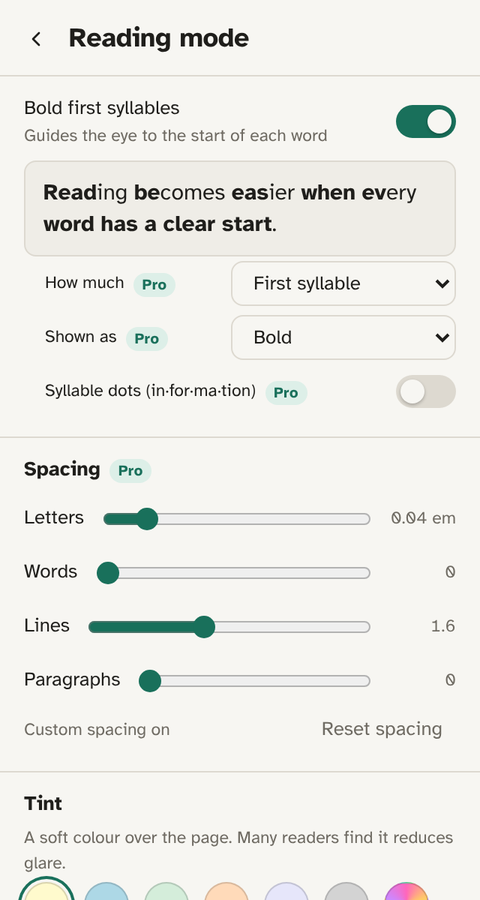
Emboldened is a Chrome extension, built in the UK by a one-person company, that also installs in Edge and Brave. It works on the live page: bolding, fonts, tint, dim, dark mode and the reading ruler apply as you read, and switching anything off restores the page exactly. There’s no account, no analytics and no conversion. The basics are free for good; Pro adds spacing, syllable dots, reader view, read-aloud from any paragraph, offline definitions and more for £85 a year.
Feature by feature
| Bionic Reading | Emboldened | |
|---|---|---|
| Bolding on web pages | Chrome extension; adjustable fixation and saccade | Free; first syllable from a 139,000-word dictionary, normal or heavy weight. Pro adds a third or half of each word, syllable dots, colour-only mode |
| Bolding in documents and ebooks | Yes: EPUB, PDF, Word, Send to Kindle (paid tiers) | No |
| Phone and tablet | iOS and Android apps and keyboard | No; desktop browsers only |
| Fonts | Its own typeface, sold separately | Atkinson Hyperlegible, Lexend, OpenDyslexic bundled, free |
| Spacing (letter, word, line, paragraph) | No | Pro, four sliders |
| Reading ruler | No | Free (row); column ruler in Pro |
| Tint, dim, dark mode | Light/dark theme in its reader | Free on any site; dark mode leaves images untouched |
| Read aloud | No | Selected text free; any paragraph with on-page player in Pro; words highlighted as spoken |
| Dictionary | No | Pro: double-click, 147,000 words, offline |
| Reader view | Its reader app | Pro, with your settings applied |
| Account | For the apps | None |
| Offline | Apps need the service for conversion | Everything works offline |
| Price | Free tier; from $1.95/month annually; fonts $79–$139 one-off | Free; Pro £85/year, 14-day trial, up to 5 devices |
Figures come from Bionic Reading’s own site and listing at the time of writing; they change, so check before buying.
How the bolding differs
Bionic Reading bolds a proportion of each word, which you tune with the fixation setting. Emboldened’s default bolds the first syllable, looked up word by word, so “understand”, “about” and “information” are split where you’d say them. For readers who find first-syllable too light, Pro offers a third or half of each word. If you have dyslexia and prefer the word’s shape untouched, Pro’s colour-only mode tints the start of each word instead of thickening it, which also makes it safe to leave on inside editors.
Neither tool changes the underlying text. In Emboldened’s case that’s a deliberate guarantee: copying and pasting from a bolded page gives you the original words, and syllable dots are drawn rather than inserted.
What Bionic Reading does better
- Documents and ebooks. If you want bolded EPUBs on a Kindle or a bolded PDF, Bionic Reading is the tool. Emboldened doesn’t touch files.
- Phones. Its apps and keyboard bring the effect to iOS and Android. Emboldened doesn’t run on mobile browsers.
- A typeface you can use anywhere. The one-off font purchase works in word processors and ereaders that accept custom fonts.
- Fine control of the bolding itself. Fixation and saccade settings let you bold, say, every second word. Emboldened keeps bolding simple and puts its options elsewhere.
What Emboldened does better
- The whole page, not just the bolding. Spacing, ruler, tint, dim, soft white and dark mode are the adjustments dyslexia and ADHD specialists usually recommend together, and they’re in one extension.
- Read-aloud with highlighting. Select text and hear it, with each sentence and word highlighted; in Pro, click any paragraph and a small player lets you pause, skip and change speed from 0.5× to 3×. It uses the voices already on your computer.
- No account, no analytics, works offline. Nothing you read leaves your computer. For a school or employer that’s often the deciding point.
- Leaves editors alone. Text boxes and editors are skipped automatically, so it can stay on all day.
- Price for browser reading. The bolding, fonts, tint, dark mode, ruler and read-selected are free with no tier limits. Pro is one yearly price for up to five devices.
Evidence
Bionic Reading’s own site makes claims about faster reading; independent testing has found little or no speed effect for typical readers, while many readers with dyslexia or attention difficulties report less fatigue. We’ve gone through what’s actually been measured in Does Bionic Reading work?. It’s worth reading before paying for any bolding tool, including ours.
Trying both
Bionic Reading’s free Discover tier lets you test the effect on pasted text and websites. Emboldened is free on the Chrome Web Store, and every Pro feature is on for the first 14 days with no card and no sign-up, so you can compare spacing, syllable dots and read-aloud on your own reading before deciding.
Questions
Can I use both at once?
You can, but two extensions bolding the same page will fight. Switch one off per site, or pick one. Emboldened has a per-site switch for exactly this.
Is Emboldened’s bolding patented or licensed from Bionic Reading?
No. Emboldened uses its own syllable dictionary to decide what to bold and has no connection to Bionic Reading GmbH.
Which works in Microsoft Edge?
Both: Edge installs Chrome Web Store extensions. Emboldened also runs in Brave and other Chromium browsers. Neither runs in Firefox or Safari.
Does Emboldened have a free tier limit?
No character limits or daily quotas. The free features are free on every page, for good. Pro is a separate set of features, not a cap.
Free to install. Every Pro feature is on for 14 days, no card. Nothing you read leaves your computer.