
Chrome extensions for reading with ADHD
Reading with ADHD usually fails in one of three ways: your eyes drift off the line and you re-read the same paragraph; something on the page moves and your attention goes with it; or the text is a wall and you bounce off it. The extensions below each fix one of those. None of them is a “focus hack” — they just remove the things that were pulling you away.
Match the tool to the failure
| What happens | What helps | Extensions |
|---|---|---|
| You lose your place and re-read | A reading ruler; bolded word starts | Emboldened, Visor, Jiffy Reader |
| Movement on the page pulls your eye | Pause animations; block adverts; hide the page around the article | Emboldened (calm mode), uBlock Origin Lite, Just Read |
| You can’t start on a wall of text | Hear it instead; shorter lines; more space | Read Aloud, Emboldened, Chrome reading mode |
| Bright pages tire you quickly | Tint, dim or dark mode | Emboldened, Dark Reader |
1. A reading ruler: Emboldened or Visor
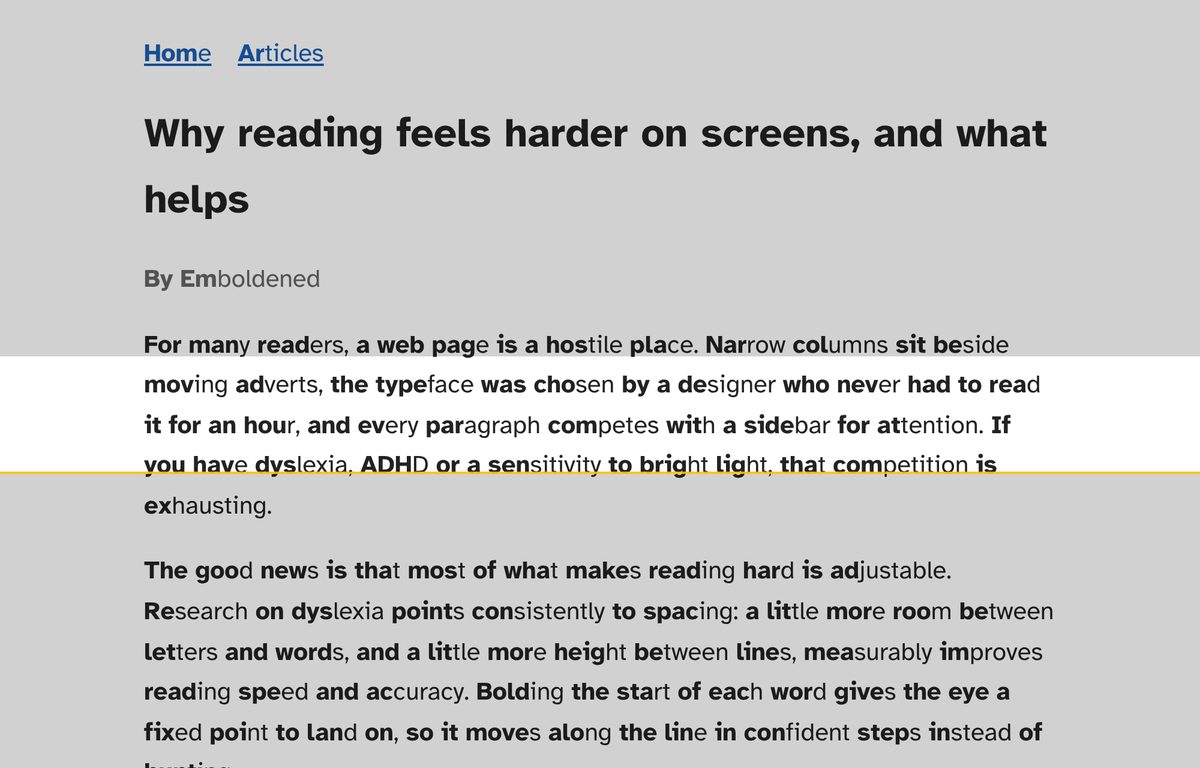
The single most useful thing for a wandering eye is a horizontal band that follows your mouse and shades everything else. You read inside the band; the rest of the page is still there but quieter. Emboldened (which we make) has one built in and free, with the band’s height and the shade adjustable, a keyboard shortcut (Alt+Shift+R), and a vertical column version in Pro for tables and code. Visor does the same thing on its own, for free, with the caveat from its listing that it has to be switched back on with every page load. If you want only a ruler, Visor; if you want the ruler and the rest of this list in one extension, Emboldened.
2. Bolded word starts: Emboldened or Jiffy Reader
Bolding the beginning of each word gives your eye a chain of anchors along the line, which is why “bionic reading” took off in ADHD communities. Does it make you faster? The evidence says probably not — see does bionic reading work? — but a lot of people with ADHD report it keeps them on the line, which is the actual problem. Emboldened bolds the first syllable from a dictionary; Jiffy Reader bolds a fraction of each word and lets you emphasise only every second or third word, a rhythm some readers prefer. Jiffy Reader is free and open source. Try both; keep one.
3. Stop things moving: calm mode and an ad blocker
Animated adverts, autoplaying video and looping GIFs are designed to take attention, and with ADHD they succeed every time. Two layers help. uBlock Origin Lite removes most adverts before they load; it’s free, has over 20 million users and uses almost no resources. For what’s left — the site’s own animations, the GIF in the forum post, the video that starts by itself — Emboldened Pro’s calm mode pauses animations, GIFs and autoplaying video on the page while leaving still images alone. Together they turn a twitching page into a still one.
4. Hear it: Read Aloud or Emboldened
When you can’t get started on a block of text, listening while the words light up gets you through it. Read Aloud reads any page or selection, works in Google Docs and PDFs, and can highlight as it goes; it’s free with your browser’s voices and open source. Emboldened reads selected text free with sentence and word highlighting, and in Pro lets you Alt+click any paragraph to start from there, with a small on-page player for pause, skip and speed (0.5× to 3×). Speed matters for ADHD: many people find 1.3× to 1.6× holds attention better than normal pace.
5. Shorter lines, more space: reader modes and spacing
A full-width paragraph in a small font is a wall. Two ways over it. Chrome’s own reading mode (in the side panel) and Just Read pull an article into a narrow, plain column at a size you choose — excellent for news and long posts, useless on web apps and forums. Emboldened goes the other way and opens up the page you’re on: line, letter, word and paragraph spacing sliders (Pro) that work on anything, plus a reader view of its own for articles. If your reading is mostly articles, start with Chrome’s reading mode because it’s free and already there.
6. Less glare: dark mode or tint
Bright white pages are tiring, and tired attention wanders. Dark Reader is the standard dark-mode extension, with seven million users, brightness and contrast controls and a sepia option; depending on the mode and the site it can recolour images, logos and diagrams as well as text, with per-site settings to tune that. Emboldened’s dark mode analyses each page and recolours text and backgrounds while leaving photos and video as they are, and it also offers a soft colour tint and a dim slider for people who find full dark mode too much. See Emboldened vs Dark Reader.
7. Definitions without leaving the page
Every time you open a new tab to look up a word, you’ve left the article and may not come back. Emboldened Pro’s double-click dictionary shows a definition in a small popover on the page, from a 147,000-word dictionary built into the extension, so it works offline; the only online part is fetching the pronunciation. Close it and you’re exactly where you were.
A setup that works for a lot of people
- uBlock Origin Lite, left alone.
- Emboldened with the Focus preset: ruler on, bolded word starts on, calm mode on (Pro), soft tint.
- Read-aloud at about 1.4× for anything longer than a screen.
- Emboldened switched off per site where you don’t want it (your email editor, your code editor).
Then stop installing things. Five extensions each doing a bit of this will fight each other and give you a new thing to fiddle with instead of reading — which, with ADHD, is its own trap.
Questions
Is bionic reading actually good for ADHD?
The studies that exist don’t find it makes people faster or improves comprehension. Many readers with ADHD still find bolded word starts help them stay on the line, which is a different benefit and one worth testing on yourself for a day. Details in does bionic reading work?.
Which of these are free?
uBlock Origin Lite, Visor, Jiffy Reader, Just Read’s core, Dark Reader, Read Aloud with browser voices, Chrome’s reading mode, and Emboldened’s free tier (bolding, ruler, fonts, tint, dim, dark mode, read selected text). Emboldened Pro, calm mode and the spacing sliders included, is £85 a year with a 14-day trial.
Do these work for reading documentation and code?
Rulers and bolding do; reader modes don’t, because they can’t extract a docs page or a code review. Emboldened leaves code blocks un-bolded by design and offers a column ruler for tables. See Emboldened for programmers with ADHD.
Will any of this help with reading on my phone?
Chrome on Android and iOS doesn’t run extensions. On a phone, use the browser’s built-in reader view and your phone’s text-to-speech; Jiffy Reader has a Safari version for iPhone.
Free to install. Every Pro feature is on for 14 days, no card. Nothing you read leaves your computer.