
A free Bionic Reading alternative that works on any web page
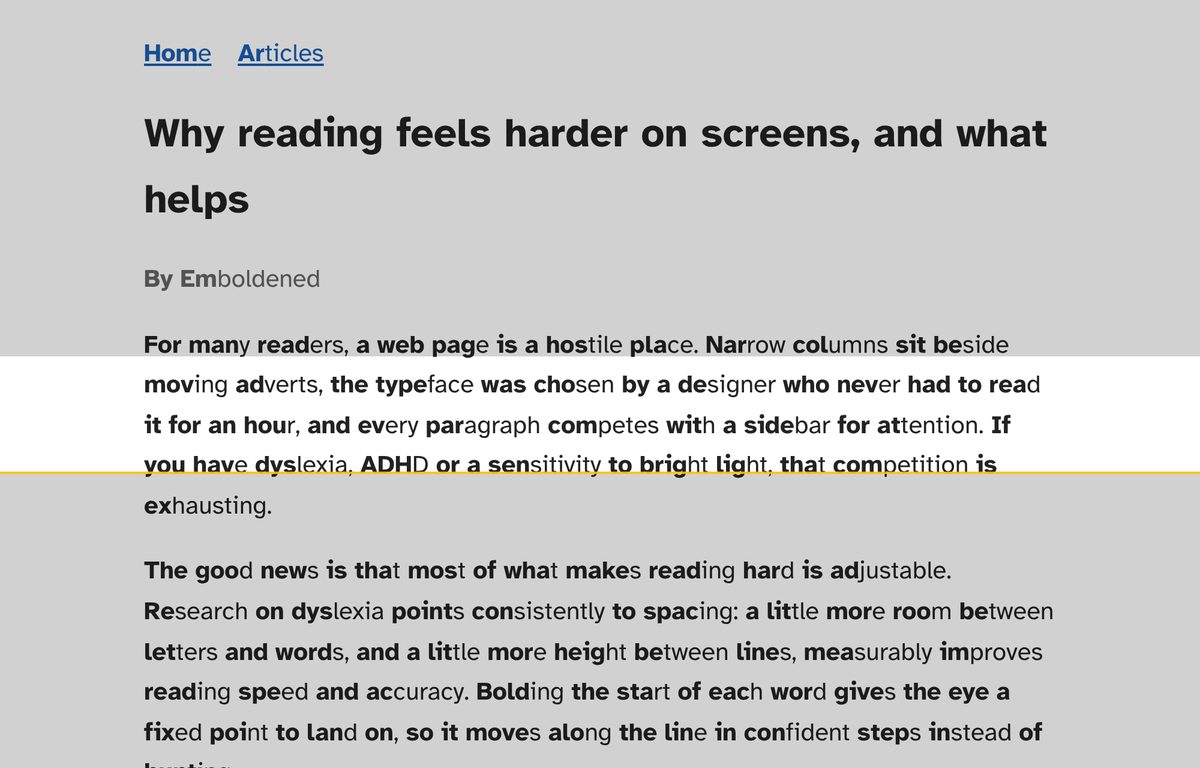
Emboldened is a Chrome and Edge extension that bolds the first syllable of every word on the page you’re reading, live, with no account and no conversion step. The bolding is free for good, and it sits alongside the things Bionic Reading doesn’t do: spacing, a reading ruler, tint, a dark mode that leaves pictures alone, and read-aloud.
Why people go looking for an alternative
Bionic Reading made “bold the start of each word” famous, and for a lot of readers the effect is real: the eye has somewhere to land, so it moves along the line in steps instead of hunting. The frustration tends to start after that. Bionic Reading is sold as a family of apps and fonts: a reader app with a free “Discover” tier and paid Premium and Premium Plus tiers, a paid Word add-in, a paid keyboard, and one-off font purchases. Its Chrome extension has about 100,000 users and, at the time of writing, a 2.4-out-of-5 rating on the Web Store, where the most common complaints are about pages it doesn’t handle and the steps needed to get going.
If what you actually wanted was “make the page I’m already reading easier to read”, the apparatus around it gets in the way. That’s the gap Emboldened is built for.
What Emboldened does instead
Install it, switch on Bold first syllables, and every page you open is bolded as it loads, including pages that keep loading as you scroll. The bolding uses a 139,000-word syllable dictionary, so “information” becomes information and “about” becomes about rather than a fixed number of letters. You can choose normal or heavy weight. Switch it off and the page goes back exactly as it was, no reload.
Two details matter if you’ve used other bolding tools. First, text boxes and editors are left alone, so it doesn’t interfere with Gmail, Google Docs or a form you’re filling in. Second, the bolding doesn’t alter the page’s text: if you copy a sentence and paste it somewhere, you get the original words with nothing added.
Side by side
| What you want | Bionic Reading | Emboldened |
|---|---|---|
| Bold the start of each word on a live web page | Yes, via its Chrome extension | Yes, free |
| Convert pasted text or files (EPUB, PDF, Word) | Yes; limits by tier (2,000 characters on the free tier, more on paid) | No. Emboldened works on web pages only |
| Send to Kindle, download converted files | Paid tiers | No |
| Letter, word, line and paragraph spacing | No | Yes (Pro) |
| Reading ruler that follows the mouse | No | Yes, free |
| Colour tint, dim, soft white | Opacity and colour settings for the bolding | Yes: six tints and a dim slider free; soft white in Pro |
| Dark mode that leaves images untouched | Light/dark mode within its reader | Yes, free, on any site |
| Read aloud with word highlighting | No | Yes: selected text free; from any paragraph with an on-page player in Pro |
| Dyslexia-friendly fonts | Sells its own fonts ($79 one-off) | Atkinson Hyperlegible, Lexend and OpenDyslexic bundled, free |
| Account needed | For the reader apps | No |
| Price | Free tier; Premium from $1.95 a month billed annually, Premium Plus from $8.25 a month | Free; Pro £85 a year with a 14-day trial |
Prices and figures are taken from Bionic Reading’s own pricing page and Web Store listing at the time of writing and will change; check them before you decide.
Where Bionic Reading is the better choice
Be clear-eyed about this. If you read mostly in ebooks and documents rather than in a browser, Bionic Reading is built for you and Emboldened isn’t: it converts EPUBs, PDFs and Word files, sends them to a Kindle, and offers its typeface for use in other software. If you want bolded text on your phone, Bionic Reading has iOS and Android apps and a keyboard; Emboldened is a desktop browser extension. And if the bolding alone is what you’re after and you’ve already paid for fonts, there’s no reason to switch.
Where Emboldened is the better choice
If your reading happens in a browser (articles, documentation, course material, email, the web in general) and you’d rather not convert anything, Emboldened does the bolding on the page itself, and then keeps going. The free tier includes the things dyslexia specialists usually recommend together: bolded word starts, a choice of three readable fonts, a tint for glare, a reading ruler, a dark mode that doesn’t invert your photos, and read-aloud for selected text. Three presets (Dyslexia, Focus and Light-sensitive) set several of these at once.
Pro, at £85 a year, adds the controls for longer, deeper reading: letter, word, line and paragraph spacing on separate sliders (letter spacing is the best-evidenced adjustment for dyslexia; see the research), syllable dots that split long words, bolding a third or half of each word if first-syllable isn’t enough, a colour-only bolding mode that’s safe to use in editors, reader view, read-aloud from any paragraph you click with an on-page player, and a 147,000-word dictionary on double-click that works offline. Every Pro feature is switched on for 14 days when you install, with no card and no sign-up, so you can find out whether it’s worth it to you before paying anything.
Does the bolding actually help?
Honest answer: it depends on the reader, and the evidence for speed gains in the general population is weak. We’ve written up what the studies found in Does Bionic Reading work?. The short version is that many people with dyslexia or attention difficulties find it makes reading less tiring, which is a different claim from “everyone reads faster”, and it’s the reason Emboldened treats bolding as one tool among several rather than the whole product.
Privacy
Emboldened has no accounts and no analytics, and nothing you read leaves your computer. The only network calls it ever makes are checking a Pro licence key and, if you use definitions, fetching a word’s phonetic spelling. Everything else, including all free features, works offline. If you’re choosing a tool for a school or workplace, that’s often the deciding factor.
Getting it
Emboldened is free on the Chrome Web Store and installs in Microsoft Edge and Brave as well. There’s nothing to sign up for.
Questions
Is Emboldened’s bolding the same as Bionic Reading’s?
The idea is the same: emphasise the start of each word so the eye has a fixation point. Emboldened chooses the bolded part by syllable from a dictionary of 139,000 words, and lets you bold a third or half of each word instead (Pro). Bionic Reading uses its own patented method and settings.
Does Emboldened work on PDFs or ebooks?
No. It works on web pages in Chrome, Edge and other Chromium browsers. For converting files, Bionic Reading or a dedicated reader app is the better tool.
Do I need an account?
No. Install it and use it. A Pro licence key is only needed if you buy Pro after the 14-day trial.
Will it slow pages down?
Bolding runs in small batches while the page is idle, and it skips editors, code and text boxes. Pages that keep loading as you scroll are bolded as new content arrives.
Free to install. Every Pro feature is on for 14 days, no card. Nothing you read leaves your computer.