
ADHD and reading online: what actually helps
If you have ADHD, you can probably read perfectly well. What you can’t reliably do is read a web page: get to the end of a long article, remember what the first half said, and not find yourself three tabs away with no memory of leaving. The difficulty isn’t decoding words; it is holding attention and working memory steady against a page designed to pull both apart. Here is what the research says is going on, and the five changes that help most.
It isn’t the reading
Studies of reading comprehension in ADHD point away from word-level skills and towards memory. Miller and colleagues (2013, Research on Child and Adolescent Psychopathology) compared children with ADHD to controls matched on word-reading ability and asked them to retell a passage. The ADHD group’s biggest shortfall was in recalling the central ideas, and working memory explained most of that gap. In other words, the words went in; holding the thread while more words arrived is where it broke.
That matches what people with ADHD describe: reaching the bottom of a page and realising nothing stuck; re-reading the same paragraph because attention left halfway through a sentence; a wandering mind that returns to find the eyes have carried on without it. None of that is a reading problem, and none of it is fixed by reading more slowly or “concentrating harder”.
Why web pages make it worse
A printed page is still. A web page is not. It has movement in the margins (adverts, carousels, autoplaying video), competing text (sidebars, related links, comments), and an infinite supply of exits (every link, every tab). Each of these is a bid for attention, and ADHD attention is not well defended against bids. Even when the page is quiet, long unbroken columns of text give the eye nothing to hold on to, so the place is lost the moment attention flickers.
So the useful changes are the ones that reduce bids for attention and give the eye and the memory something to anchor to. In practice that means five things.
1. Hide everything except the lines you are reading
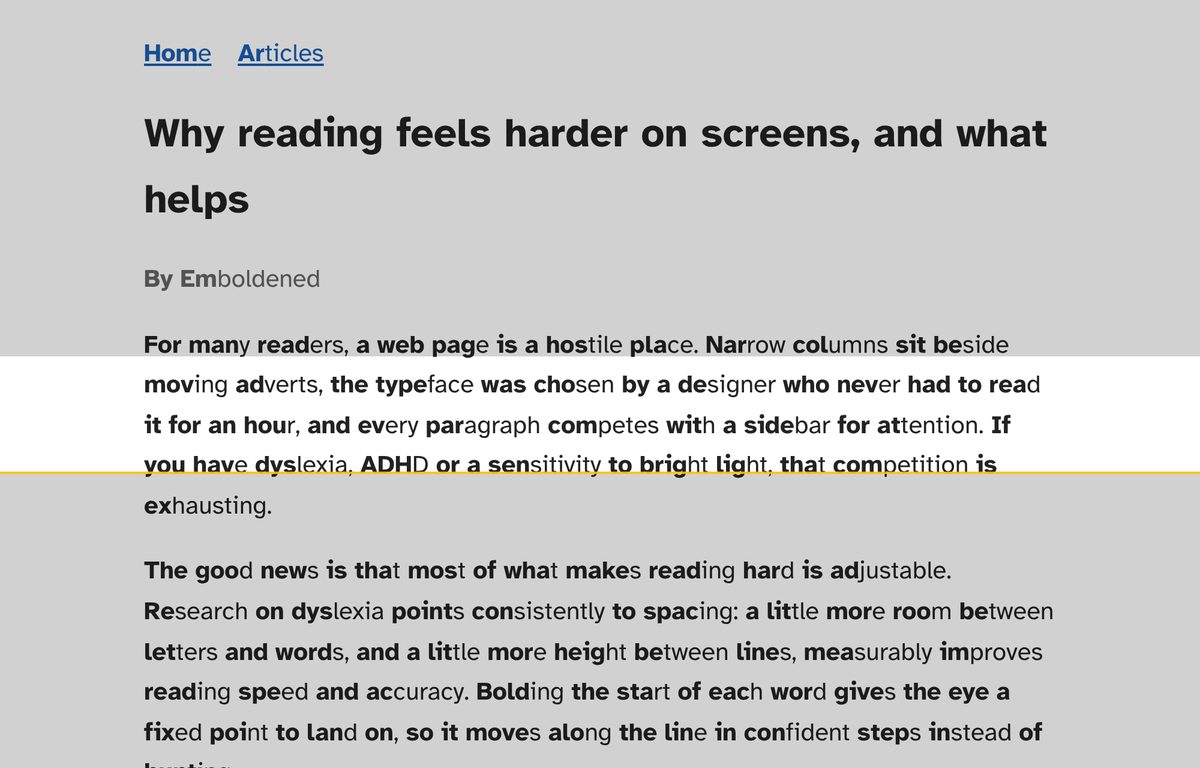
A reading ruler shows a clear band around the current line or two and shades the rest of the page. It does two jobs at once: it removes the visual competition above and below, and it gives you a fixed place to return to when your attention comes back. Of all the tools people with ADHD try, this is the one most often kept. Emboldened’s ruler follows your mouse and is free; set the band height and how dark the shade is, and toggle it with Alt+Shift+R.
2. Stop things moving
Peripheral motion captures attention by reflex, and a looping GIF or autoplaying video beside an article is a reflex trigger every few seconds. Pausing animations, GIFs and autoplay removes the trigger without removing the content. Emboldened’s calm mode does this (Pro); Google’s free Animation Policy extension stops animated images only. Either is better than nothing.
3. Take the article out of the page
A reader view removes sidebars, comments, adverts and links, leaving the text alone on a plain background. It is the single biggest reduction in “exits”. Chrome’s built-in Reading mode does this in a side panel; Emboldened’s reader view (Pro) does it on a full page with your own font, spacing and bolding kept, and can read the article aloud.
4. Read with your ears and eyes together
When text is read aloud and each word is highlighted as it is spoken, the eyes and the ears are doing the same job at the same pace. For many people with ADHD this is the difference between a page they can finish and one they can’t: there is a second channel holding the thread, and the highlight shows exactly where attention should be when it returns. Emboldened reads selected text free, with sentence and word highlighting; Pro adds starting from any paragraph you Alt+click and a player for pause, skip and speed. Speeding up slightly (1.2× to 1.5×) helps some people stay engaged; experiment.
5. Give the eye a rhythm
Bolded word starts and a little extra line spacing give the eye regular landing points, so when attention returns there is a visible place to resume. The evidence for bolding is weaker than for the other four, as we set out in does bionic reading work?, but it is free to try and many readers with ADHD keep it on as a place-keeping aid rather than a speed aid.
A set-up that works for most people
- Install Emboldened from the Chrome Web Store and tap the Focus preset. It switches on the ruler and calm mode.
- For anything longer than a few screens, open reader view and press Read aloud, or Alt+click the paragraph you are up to.
- Switch the extension off for sites where you are working rather than reading (your email, your task tool) using the per-site toggle, so the ruler isn’t in the way.
Everything above applies live to the page you are on and comes off just as fast, so there is no cost to trying each one on the next article you read.
What doesn’t help much
Speed-reading apps that flash one word at a time remove the ability to look back, which is exactly what you need when attention drops. Timers and “focus modes” that block sites help with getting started but do nothing once you are on the page. Reading slower gives attention more time to leave.
Questions
Is this medical advice?
No. These are reading accommodations that reduce distraction and support memory while reading on screen. For diagnosis and treatment of ADHD, speak to a GP or specialist.
Which one change should I try first?
The reading ruler. It is free, it works in a second, and it addresses both problems at once: competing content and losing your place.
Does read-aloud count as reading?
Yes. Comprehension is the goal, not the route. Listening while following the highlight uses both channels, and for many people with ADHD it is simply the way more goes in.
Will the ruler get in the way on web apps?
It can, which is why there is a per-site switch. Keep it on for reading sites and off for tools, and the choice is remembered.
Free to install. Every Pro feature is on for 14 days, no card. Nothing you read leaves your computer.