
Emboldened vs Dark Reader
Dark Reader is the extension most people reach for when a white page hurts: seven million users, open source, and it darkens almost everything. Emboldened’s dark mode does less and is more careful: it analyses each page’s colours, darkens text and backgrounds, and leaves images, photos and video exactly as they are. Which you want depends on why you want dark mode.
What each one does
Dark Reader
Dark Reader is an open-source extension for Chrome, Firefox, Safari and Edge, maintained by Dark Reader Ltd. Its Web Store listing describes the core method plainly: it “inverts bright colors to make web pages high contrast”, and lets you adjust brightness, contrast, sepia and font settings, apply it to every page or to a list of sites, follow the system’s dark-mode setting, and leave already-dark sites alone. It’s free, it’s featured by Google, and at about seven million users with a 4.3 rating it has earned its position. The developer states that it doesn’t collect user data.
Emboldened
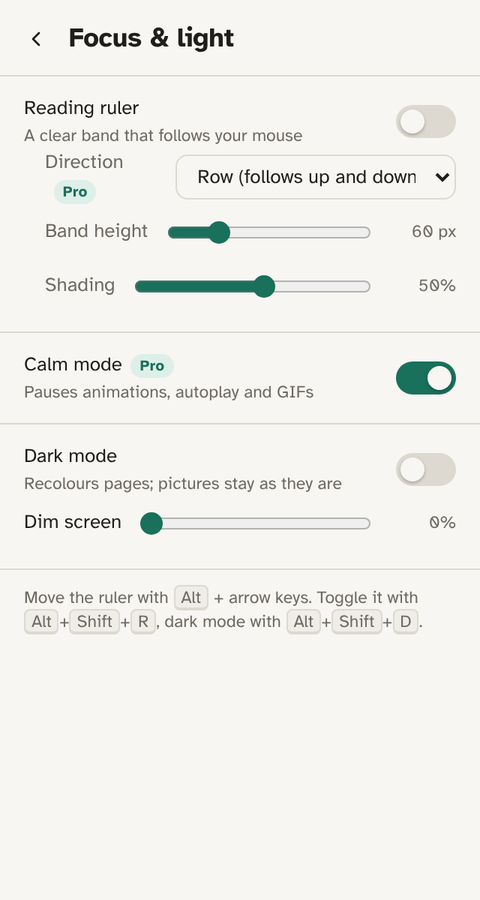
Emboldened is a reading extension for Chrome and Edge. Dark mode is one of its light controls, next to a tint, a dim slider and (in Pro) a soft-white mode, and all of them sit alongside bolded word starts, readable fonts, a reading ruler and read-aloud. Its dark mode works by reading each element’s computed colours and choosing dark equivalents for text and backgrounds, rather than inverting the page, and it doesn’t touch images, photos or video at all. It’s free, there’s no account, and nothing you read leaves your computer.
Inverting versus recolouring
This is the whole difference, so it’s worth being precise. An inversion-based dark mode treats the page as a picture and flips light to dark. It’s fast and it works on nearly any site, but it has side effects: photographs come out as negatives unless the tool detects and re-inverts them, brand colours shift, and pages that mix light and dark regions can end up patchy. Dark Reader has had years of work on handling those cases and does it well most of the time; its filter and dynamic approaches are a large part of why it’s popular.
A recolouring dark mode looks at the actual colours of text and backgrounds and replaces light with dark and dark with light on a per-element basis, judged by luminance. Images are simply skipped. The result is that a news article with photographs goes dark around the photographs, which stay as the photographer intended, and a blue link stays recognisably blue. The trade-off is that it’s a reading tool’s dark mode: it’s designed for pages you read, and complex web apps with heavy custom styling may darken less completely than Dark Reader would.
Side by side
| Dark Reader | Emboldened | |
|---|---|---|
| How it darkens | Inverts bright colours; adjustable brightness, contrast, sepia | Analyses colours and recolours text and backgrounds by luminance |
| Images, photos, video | Handled by the tool; results vary by site | Never touched |
| Coverage of complex web apps | Very broad, years of site-specific fixes | Good on pages you read; less complete on heavily styled apps |
| Per-site on/off | Yes | Yes (for the whole extension) |
| Follow system dark mode | Yes | No; keyboard shortcut Alt+Shift+D instead |
| Dim screen | Brightness setting | Separate dim slider, free |
| Colour tint / sepia | Sepia filter | Six soft tints, free; soft white (cream) in Pro |
| Bolded word starts, fonts, spacing, ruler | No | Yes (bolding, fonts and ruler free; spacing in Pro) |
| Read aloud | No | Yes |
| Browsers | Chrome, Firefox, Safari, Edge | Chrome, Edge, Brave and other Chromium browsers |
| Open source | Yes | No |
| Price | Free (donations) | Free; Pro £85 a year for the deeper reading tools |
Dark Reader’s description and figures are from its own site and Chrome Web Store listing at the time of writing.
What Dark Reader does better
- Coverage. It darkens almost anything, including web apps with elaborate styling, and it has site-specific fixes accumulated over years.
- Control over the darkening itself. Brightness, contrast, sepia and font settings, with the option to follow your system theme automatically.
- Firefox and Safari. Emboldened doesn’t run there.
- Open source and free with no paid tier. If you want to read the code, you can.
- Scale and track record. Seven million users is its own kind of evidence.
What Emboldened does better
- Pictures stay pictures. If you read pages with photographs, diagrams or video and you’re tired of negatives and washed-out charts, this is the reason to switch, or to run Emboldened’s dark mode on those sites and Dark Reader elsewhere.
- Light control for light sensitivity, not just darkness. Many people with photophobia or migraine don’t want a black page with bright text; they want less light. Emboldened gives you a tint, a dim slider and (Pro) a cream background, and a Light-sensitive preset that sets them together. See photophobia and screens.
- The reading tools around it. Dark Reader is a dark-mode tool. Emboldened is a reading tool whose dark mode is one control among bolding, fonts, spacing, ruler, read-aloud and definitions.
- Calm mode. Pro pauses animations, GIFs and autoplaying video, which for light-sensitive readers is often as important as the colour of the page.
- Restores the page exactly. Switch dark mode off and the page is back as it was, no reload.
Running both
Plenty of people do. Dark Reader’s listing advises disabling similar extensions to avoid conflicts, and that applies here: two dark modes on one page produce odd results. The sensible arrangement is to pick one per site. Emboldened has a per-site switch for the whole extension, and Dark Reader has its own site list, so you can leave Dark Reader on your web apps and Emboldened on the pages you read.
Getting it
Both are free. Emboldened is on the Chrome Web Store; its dark mode, tint, dim and ruler are free with no account, and every Pro feature is on for 14 days when you install.
Questions
Why does Dark Reader turn my photos into negatives sometimes?
Because inversion flips every colour, and detecting which parts of a page are photographs isn’t perfect. Dark Reader handles most cases; the ones it misses are the ones Emboldened avoids by never touching images at all.
Does Emboldened’s dark mode work on every website?
On pages you read, yes. Heavily styled web apps may darken less completely than they would with Dark Reader. Switch it off per site if a page looks wrong.
I don’t want dark mode, I want the page less bright. Which?
Emboldened: use the dim slider and a soft tint, or the Light-sensitive preset. Dark Reader’s brightness setting also works but still inverts the page.
Is there a keyboard shortcut?
Emboldened: Alt+Shift+D toggles dark mode (Alt+Shift+R the ruler, Alt+Shift+B bolding). You can change them at chrome://extensions/shortcuts.
Free to install. Every Pro feature is on for 14 days, no card. Nothing you read leaves your computer.